






How to Build an OpenAI Agent Builder Workflow with Email, Calendar Integration, and React Interface
Learn how to create a complete automation workflow using OpenAI's Agent Builder, integrating Gmail and Google Calendar through Zapier, and embedding it in a React-powered web interface for real-world business applications. This comprehensive guide walks through every step of building, deploying, and scaling an intelligent customer interaction system.
Introduction to OpenAI Agent Builder
OpenAI's Agent Builder represents a paradigm shift in workflow automation, enabling businesses to create sophisticated AI-powered systems without extensive coding or deep technical expertise. This powerful platform abstracts away the complexity of AI integration, allowing teams to focus on business logic and user experience rather than infrastructure concerns.
This guide demonstrates a practical, production-ready implementation: a dental clinic chatbot that intelligently handles customer inquiries, manages appointment scheduling, sends professional confirmation emails, and automatically creates calendar events. The system showcases the full potential of Agent Builder by orchestrating multiple AI agents, each specialized for specific tasks, working together in a coordinated workflow.
While this example focuses on a dental clinic use case, the architecture, design patterns, and implementation strategies are universally applicable. The same foundational approach can be adapted for any business scenario requiring intelligent automation, appointment scheduling, customer interaction, or process orchestration. Industries ranging from healthcare and professional services to education and e-commerce can leverage this architecture to transform their customer experience and operational efficiency.
Why OpenAI Agent Builder Matters for Business
Traditional automation solutions often require significant development resources, specialized AI expertise, and ongoing maintenance overhead. Agent Builder democratizes this capability by providing:
- Low-code workflow creation: Visual interface for building complex multi-agent systems without writing backend code
- Native AI capabilities: Built-in access to GPT-4 and other OpenAI models for natural language understanding
- Seamless integrations: Direct connections to external services via Zapier, webhooks, and API calls
- Rapid iteration: Test and deploy changes in minutes rather than days
- Enterprise scalability: Production-ready infrastructure that handles high volumes without custom DevOps
Workflow Architecture Overview
The workflow architecture follows a modular, agent-based design pattern that promotes reusability, maintainability, and clear separation of concerns. Each agent in the system has a well-defined responsibility, making the overall solution easier to understand, debug, and extend.
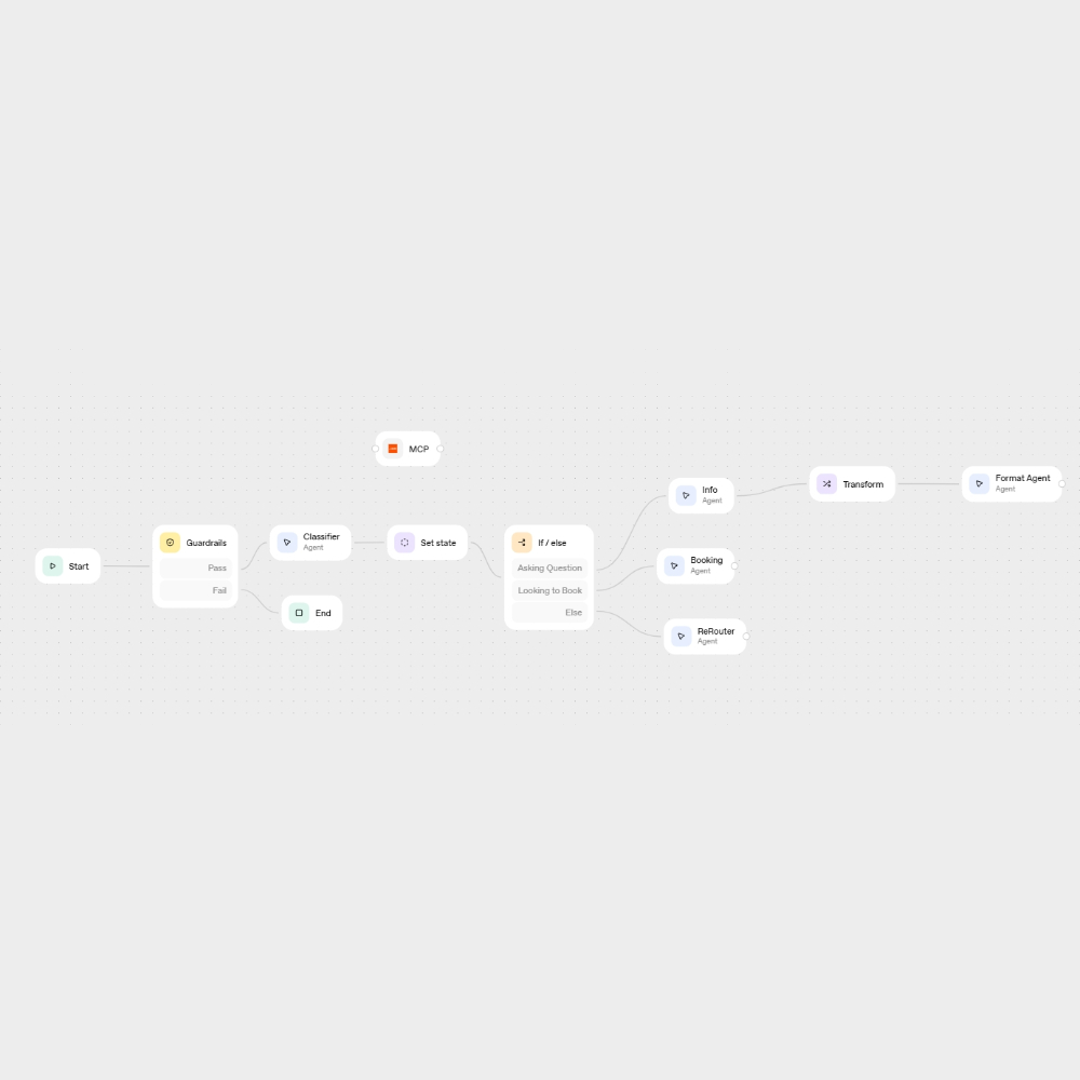
The complete workflow orchestrates four specialized agents, each handling a distinct aspect of the customer interaction lifecycle:
- Classification Agent: Acts as the intelligent router, analyzing user input to determine intent. It distinguishes between information-seeking queries ("What services do you offer?") and action-oriented requests ("I want to book an appointment"). This initial classification is critical for routing the conversation to the appropriate downstream agent.
- Information Agent: Serves as the knowledge expert, leveraging a vector store (RAG - Retrieval Augmented Generation) populated with business documentation. It provides accurate, contextual answers about services, pricing, team members, and clinic details by searching through embedded PDF documents and returning structured, formatted responses.
- Booking Agent: Functions as the appointment orchestrator, managing the complete booking lifecycle. It extracts appointment details from natural language, calculates durations, creates Google Calendar events, and sends confirmation emails—all through seamless Zapier integration. This agent demonstrates the power of combining AI understanding with external service automation.
- ReRouter Agent: Acts as the boundary guardian, gracefully handling out-of-scope queries and maintaining conversation quality. When users ask about topics outside the system's domain (sports scores, weather, etc.), this agent politely redirects them while maintaining a helpful, professional tone.
Step 1: Classification Agent - Intent Recognition
The workflow begins with intelligent intent classification, which is fundamental to providing the right response at the right time. The Classification Agent sets a global state variable {{issue_category}} that drives all downstream decision-making.
This agent uses carefully crafted prompts with few-shot examples to ensure accurate classification even with ambiguous or complex user inputs. The conditional logic branches the conversation flow based on the classified intent, ensuring users receive responses from the most appropriate specialized agent.
By separating classification from action, the architecture remains flexible and extensible. Adding new intents or conversation paths becomes a matter of updating the classification logic and adding corresponding agent routes, rather than rewriting the entire system.
Step 2: Information Agent - Knowledge Retrieval with RAG
When a user's intent is classified as "Asking Question", the workflow routes to the Information Agent. This agent implements Retrieval Augmented Generation (RAG) by:
- Converting user queries into semantic embeddings
- Searching the vector store for relevant document sections
- Synthesizing information from multiple sources in the knowledge base
- Formatting responses using structured output schemas
The agent returns a comprehensive JSON object containing service details, pricing, team information, and clinic contact details. This structured data ensures consistency and enables easy integration with other systems or analytics platforms.
Step 3: Format Agent - Response Presentation
The structured data from the Information Agent flows into the Format Agent, which transforms technical JSON into user-friendly Markdown. Using Agent Builder's Widget Builder, this agent creates visually appealing, well-structured responses with:
- Clear headings and subheadings for hierarchy
- Bullet lists for features and options
- Bold and italic formatting for emphasis
- Consistent visual layout across all information responses
This separation between data retrieval and presentation allows independent updates to either the knowledge base or the display format without affecting the other.
Step 4: Booking Agent - Appointment Orchestration
When intent is classified as "Looking to Book", the Booking Agent takes over. This sophisticated agent:
- Analyzes the full conversation history to extract appointment details
- Validates required information (date, time, contact email)
- Requests missing details conversationally if needed
- Looks up treatment durations from the vector store
- Calculates total appointment duration for multi-treatment bookings
- Creates a Google Calendar event via Zapier MCP integration
- Sends a professional confirmation email through Gmail
- Confirms completion to the user
This multi-step process happens seamlessly, with the agent handling edge cases, validation, and error recovery automatically.
Step 5: ReRouter Agent - Boundary Management
The ReRouter Agent activates when users ask questions outside the system's scope. Instead of attempting to answer unrelated queries (which could produce hallucinations or inappropriate responses), this agent politely redirects users back to supported topics while maintaining a helpful, professional tone. This boundary management is crucial for maintaining system reliability and user trust.
Technical Deep Dive: Vector Store Implementation
The vector store is powered by OpenAI's embeddings technology, which converts text into high-dimensional numerical representations that capture semantic meaning. When you upload a PDF document to the vector store:
- The document is chunked into logical sections (paragraphs, headings, etc.)
- Each chunk is converted to a vector embedding using OpenAI's embedding models
- Embeddings are stored with metadata for efficient retrieval
- At query time, the user's question is also embedded and compared against stored chunks
- The most semantically similar chunks are retrieved and provided to the agent as context
This RAG approach ensures responses are always grounded in your actual business documentation, dramatically reducing hallucinations while maintaining conversational fluency. Unlike traditional keyword search, semantic similarity matching understands intent and context, returning relevant information even when exact keywords don't match.
Zapier MCP Integration: Connecting to External Services
The Model Context Protocol (MCP) integration with Zapier is what enables the Booking Agent to interact with Gmail and Google Calendar. This integration requires:
- A Zapier account with appropriate plan (includes MCP access)
- OAuth authentication for Google Workspace services
- MCP server token generated from Zapier dashboard
- Configuration in Agent Builder to expose Gmail and Calendar as tools
Once configured, these external services become native tools within your agents, callable with simple natural language instructions. The agent handles all API complexity, authentication, and data formatting automatically.
React Integration: Building the Web Interface
The workflow is integrated into a React application with a floating chat interface. The implementation uses Next.js with TypeScript for type safety and modern React patterns.
Repository and Setup
Clone the project repository from GitHub and create a .env.local file with two required environment variables:
OPENAI_API_KEY=your_openai_api_key
NEXT_PUBLIC_CHATKIT_WORKFLOW_ID=your_workflow_id
These credentials are available in your OpenAI Agent Builder dashboard.
ChatApp Component Implementation
The main chat component (ChatApp.tsx) handles the workflow panel integration:
"use client";

import { useCallback } from "react";
import { ChatKitPanel, type FactAction } from "@/components/ChatKitPanel";

export default function ChatApp() {
  const handleWidgetAction = useCallback(async (action: FactAction) => {
    if (process.env.NODE_ENV !== "production") {
      console.info("[ChatKitPanel] widget action", action);
    }
  }, []);

  const handleResponseEnd = useCallback(() => {
    if (process.env.NODE_ENV !== "production") {
      console.debug("[ChatKitPanel] response end");
    }
  }, []);

  return (
    <div className="mx-auto w-full h-full">
      <ChatKitPanel
        theme="light"
        onWidgetAction={handleWidgetAction}
        onResponseEnd={handleResponseEnd}
        onThemeRequest={() => {}}
      />
    </div>
  );
}
Floating Chat Button Implementation
The chat interface is rendered as a floating button that expands into a full panel. Here's the implementation from page.tsx:
<motion.button
  whileHover={{ scale: 1.1 }}
  whileTap={{ scale: 0.95 }}
  onClick={() => setIsChatOpen(!isChatOpen)}
  className="fixed bottom-8 right-8 bg-gradient-to-r from-sky-500 to-sky-600 text-white p-4 rounded-full shadow-2xl hover:shadow-sky-300/30 z-50 text-2xl leading-none"
>
  💬
</motion.button>

{/* CHAT PANEL */}
<div className={`fixed bottom-24 right-8 w-full max-w-md h-[70vh] z-50 ${
  isChatOpen ? "block" : "hidden"
}`}>
  <div className="bg-white/95 backdrop-blur-lg rounded-2xl shadow-2xl border border-sky-100 h-full flex flex-col overflow-hidden">
    <header className="bg-gradient-to-r from-sky-500 to-sky-600 text-white p-4 flex justify-between items-center rounded-t-2xl">
      <h3 className="font-semibold text-lg">Asistente Virtual</h3>
      <button onClick={() => setIsChatOpen(false)} className="text-white/80 hover:text-white transition">
        ✕
      </button>
    </header>
    <div className="flex-grow">
      <ChatApp />
    </div>
  </div>
</div>
This implementation uses Framer Motion for smooth animations and Tailwind CSS for styling, creating a modern, accessible chat experience that integrates seamlessly with any existing website.
Business Applications Beyond Dental Clinics
The true power of this Agent Builder implementation lies in its versatility and adaptability. While the dental clinic example provides a clear, relatable use case, the underlying architecture and workflow patterns are intentionally generic and can be customized for virtually any industry or business model.
The core components—intelligent classification, knowledge retrieval, and automated scheduling—represent fundamental business processes that span across sectors. By maintaining this modular design, organizations can rapidly deploy similar systems tailored to their specific needs with minimal reconfiguration.
This architecture can be adapted for numerous industries and use cases:
- Medical Practices: Multi-specialty clinics, physical therapy centers, mental health services, telemedicine platforms, and diagnostic labs. The system can handle specialty-specific booking requirements, insurance verification, and HIPAA-compliant communication.
- Professional Services: Legal consultations, financial advisory sessions, coaching and mentoring, accounting services, and real estate showings. Each profession can customize the knowledge base with their specific expertise and compliance requirements.
- Beauty & Wellness: Hair salons, nail studios, spas, massage therapy, fitness studios, and personal training. The system handles service-specific duration calculations, stylist/trainer preferences, and recurring appointment patterns.
- Education: Tutoring services, music lessons, course enrollment, office hours scheduling, and academic advising. Educational institutions can integrate with student information systems and learning management platforms.
- Consulting & Advisory: Discovery calls, project scoping meetings, technical assessments, and strategic planning sessions. The system can route to appropriate consultants based on expertise areas extracted from conversation context.
- Home Services: Plumbing, electrical, HVAC, cleaning, and maintenance services. Workflows can include service area verification, equipment requirements gathering, and automated follow-up scheduling.
Each of these adaptations maintains the core workflow structure while customizing the knowledge base content, business rules, and integration endpoints to match industry-specific requirements.
Next Steps and Advanced Features for Production Deployment
Once the foundational workflow is operational, numerous enhancement opportunities emerge to elevate the system from a proof-of-concept to a robust, enterprise-grade solution. These advanced features not only improve user experience but also provide critical business intelligence and operational capabilities.
Consider implementing these enhancements to create a more comprehensive solution:
- Multi-language support: Implement language detection agents that automatically identify the user's preferred language and route to corresponding translation agents. This enables truly global operations without maintaining separate workflows for each language. OpenAI models excel at multilingual understanding, making this a straightforward extension.
- Payment integration: Connect Stripe, PayPal, or other payment gateways to enable deposit collection or full payment at booking time. This reduces no-shows significantly and improves cash flow. The Booking Agent can be extended to handle payment confirmation before finalizing calendar events.
- SMS notifications: Add Twilio or similar SMS service integration for appointment reminders sent 24 hours before scheduled time. SMS typically has higher open rates than email for time-sensitive reminders, reducing missed appointments and improving operational efficiency.
- CRM integration: Sync customer interactions, appointments, and conversation history with Salesforce, HubSpot, Zoho, or other CRM platforms. This creates a unified view of customer interactions and enables advanced segmentation, personalization, and marketing automation.
- Analytics and Business Intelligence: Track key metrics including conversation volume, booking conversion rates, average handling time, customer satisfaction scores, and revenue per interaction. These insights drive continuous improvement and ROI measurement.
- Advanced scheduling logic: Implement availability checking, resource allocation, automated waitlist management, and intelligent rescheduling suggestions based on historical patterns and real-time capacity.
- Personalization engine: Build customer profiles that remember preferences, past interactions, and service history to provide increasingly tailored experiences over time.
Production Considerations and Best Practices
Deploying this system to production requires attention to several operational aspects that ensure reliability, security, and scalability:
- Rate limiting and cost management: Implement usage quotas and monitoring to prevent runaway costs from high-volume traffic or abuse
- Security and data privacy: Ensure PII (Personally Identifiable Information) is handled according to GDPR, CCPA, and other relevant regulations. Implement data retention policies and secure storage for conversation logs.
- Fallback mechanisms: Design graceful degradation paths when external services (Zapier, Google Calendar) are temporarily unavailable
- Performance monitoring: Track response times, error rates, and user satisfaction to identify issues before they impact customer experience
Conclusion: Democratizing Enterprise Automation
OpenAI's Agent Builder fundamentally democratizes workflow automation, transforming what was once the exclusive domain of well-resourced development teams into an accessible capability for businesses of all sizes. The platform enables organizations to create sophisticated, intelligently integrated systems without extensive development resources, specialized AI expertise, or months of implementation time.
The architecture demonstrated in this guide—combining intelligent classification, knowledge retrieval through vector stores, and seamless external service integration—represents a blueprint for modern customer interaction systems. By orchestrating multiple specialized agents, each focused on a specific domain, we achieve both simplicity and sophistication: simple enough to understand and maintain, sophisticated enough to handle complex real-world business processes.
What traditionally required weeks or months of custom development, extensive testing, and DevOps configuration can now be prototyped and deployed in hours to days. This acceleration doesn't come at the cost of quality—Agent Builder workflows are production-ready, scalable, and maintainable by non-technical team members.
As AI continues to evolve and Agent Builder adds new capabilities, the systems built on this platform will automatically benefit from improvements in underlying models, new integration options, and enhanced features. This future-proofing characteristic makes Agent Builder an investment in long-term competitive advantage, not just a tactical automation tool.
For organizations looking to transform customer experience, improve operational efficiency, and scale their service delivery, OpenAI Agent Builder provides a proven, accessible path forward. The question is no longer whether to automate, but how quickly you can deploy these capabilities to stay ahead of competitors who are already leveraging AI-powered customer interaction systems.